Functions
Write once, use everywhere, and how Python passes arguments
Introduction to Data Science and Machine Learning · Md Mahbub E Noor · University of Barishal
def add(a, b):
    return a + b

print(add(5, 6))
Where we are: Lecture 4, part 1
Today you will
- 1Name every part of a function definition and call
- 2Send values in with parameters, get values out with return
- 3Use keyword and default arguments
- 4Know which variables a function can see
- 5Predict what a function can and cannot change in the caller
The problem: the same lines, again and again
Without a function
account = 20
balance = 100
balance = balance + 100
print("Account:", account)
print("Balance:", balance)
balance = balance - 50
print("Account:", account)
print("Balance:", balance)
balance = balance - 10
print("Account:", account)
print("Balance:", balance)
With a function
def show(account, balance):
    print("Account:", account)
    print("Balance:", balance)

account = 20
balance = 100
balance = balance + 100
show(account, balance)
balance = balance - 50
show(account, balance)
balance = balance - 10
show(account, balance)
Change the report format once, inside show, and every call uses the new format.
You already use functions
Built-in
print(), len(), type(), input(), max(): written by Python's developers, ready to use.
From modules
math.sqrt(), pd.read_csv(): written by others, loaded with import.
Your own
Written with def. Today's topic.
Anatomy of a function
def hello():
    print("Hello World!")

hello()
Hello World!
def defines a functionParameters and arguments
def hello(name):
    print(f"Hello {name}!")

hello("Joy")
hello("Rini")
Hello Joy!
Hello Rini!
What if we forget the argument?
Predict firstdef printme(text):
print(text)
printme()What will this print? Write your prediction as a comment before you run the cell.
Answer: What if we forget the argument?
def printme(text):
    print(text)

printme()TypeError: printme() missing 1 required positional argument: 'text'
printmehas one required parameter- The call sends nothing, so Python stops with a TypeError
- The message names the missing parameter:
text - Fix:
printme("Hello")
return: hand a value back
def add(a, b):
    s = a + b
    return s

x = add(5, 6)
print(x)
11
return sends the value back and ends the functionWatch it run: a function call
WATCH FOR
- Defining a function does not run it
- At the call, a new orange frame appears
- Parameters a and b get the argument values
- return sends 11 back, and the frame disappears
Silent video: press play, pause any time.
print or return?
Predict firstdef double_print(x):
print(x * 2)
def double_return(x):
return x * 2
a = double_print(4)
b = double_return(4)
print(a, b)What will this print? Write your prediction as a comment before you run the cell.
Answer: print or return?
def double_print(x):
    print(x * 2)

def double_return(x):
    return x * 2

a = double_print(4)
b = double_return(4)
print(a, b)8 None 8
double_printshows 8, but gives nothing back- A function without return gives back
None double_returngives back 8, stored in b- To use a result later, return it
Watch it run: print versus return
WATCH FOR
- Both functions produce 8
- Only double_return hands it back
- Watch a become None, b become 8
- Shown on screen is not the same as returned
Silent video: press play, pause any time.
Returning several values
return a, b, cpacks the values into a tuple- Unpack them into separate names (Lecture 3.2)
- The number of names must match
- Avoid names like
strandsum: they hide built-ins
def check():
    return "ok", 10, 3.14

result = check()
print(result)
print(type(result))
status, num1, num2 = check()
print(status, num1, num2)('ok', 10, 3.14)
<class 'tuple'>
ok 10 3.14Keyword arguments: pass by name
- Name the parameter in the call:
age=50 - Then order does not matter
- Makes calls with many inputs easier to read
- Lecture 6 uses this a lot:
test_size=0.2
def printinfo(name, age):
    print("Name:", name)
    print("Age:", age)

printinfo(age=50, name="Miki")Name: Miki Age: 50
Default arguments: a value if none is given
age=35in the definition is a default- Leave it out and 35 is used
- Pass a value and it replaces the default
- Parameters with defaults must come after those without
def printinfo(name, age=35):
    print("Name:", name, "| Age:", age)

printinfo("Miki")
printinfo("Miki", 50)
printinfo(name="Joy", age=20)Name: Miki | Age: 35 Name: Miki | Age: 50 Name: Joy | Age: 20
The rules for arguments
Read the last line of an error first. It names the problem.
| What you typed | What Python says | What it means |
|---|---|---|
def f(age=35, name):
pass | SyntaxError: parameter without a default follows parameter with a default | Parameters with defaults must come after required ones. |
printinfo(name="Miki", 50) | SyntaxError: positional argument follows keyword argument | Positional arguments must come before keyword arguments. |
printinfo("Miki", name="Joy") | TypeError: printinfo() got multiple values for argument 'name' | name got two values: one by position, one by keyword. |
Variables inside a function stay inside
greetingis a local variable: it exists only while the function runs- Outside, Python has never heard of it
- Inputs come in through parameters
- Results go out through return
def make_greeting():
    greeting = "Hi"
    return greeting

print(make_greeting())
print(greeting)Hi NameError: name 'greeting' is not defined
How arguments are passed: names point to objects
- A variable is a name that points to an object
- Passing an argument does not copy the object
- The parameter becomes a second name for the same object
- Python's rule is called pass by object reference (or pass by assignment)
- It is neither classic call by value nor call by reference
Evidence: the same object inside and outside
id()gives an object's identity number- Same number means same object
- So the function received the object itself, not a copy
- Your numbers will differ; they only need to match
def show_id(arg):
    print("inside: ", id(arg))

var = "Hello"
print("outside:", id(var))
show_id(var)outside: 139860846426944 inside: 139860846426944
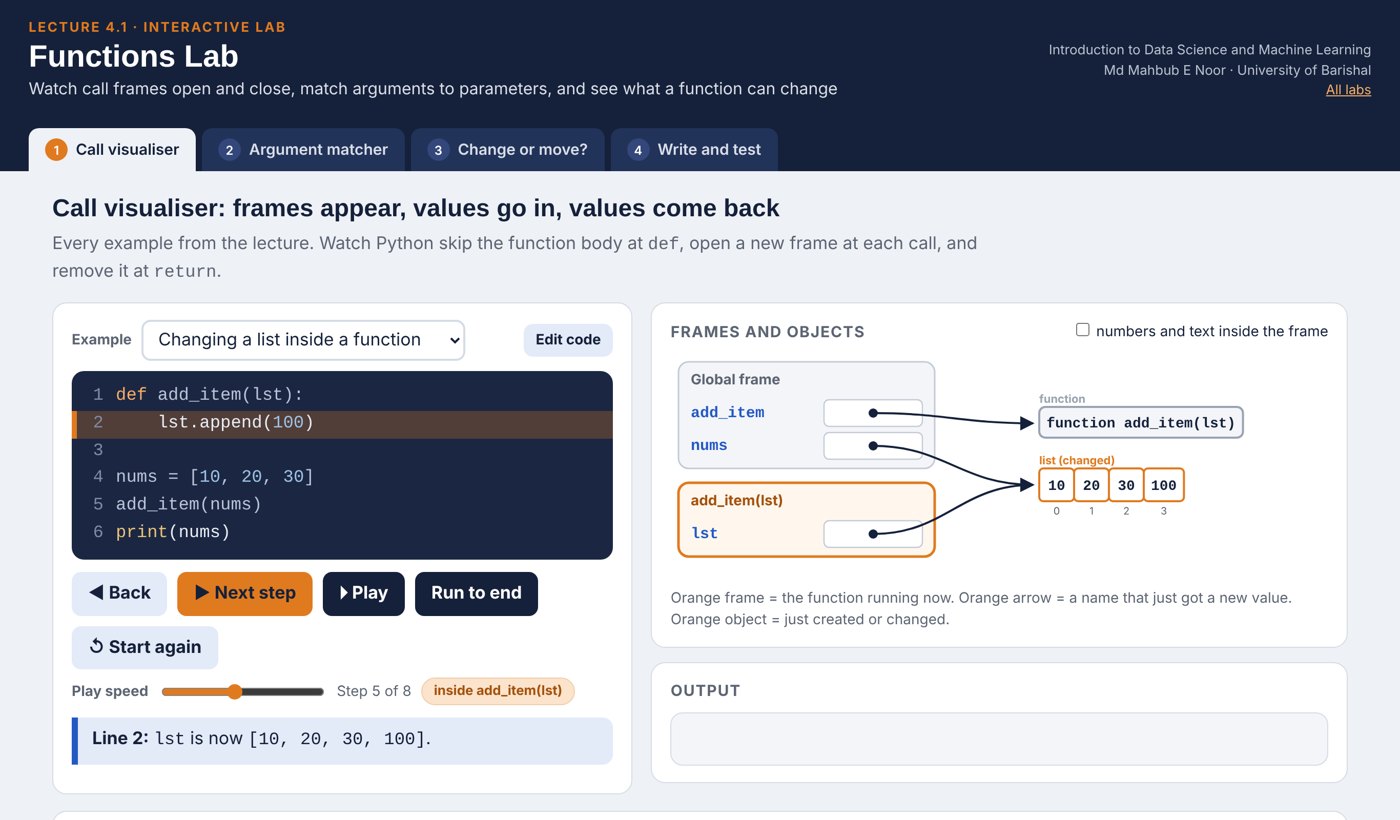
Changing a list inside a function changes it outside
lst.append(100)changes the list object itselfnumsnames that same object- So the caller sees the change
- Lists and dictionaries are mutable: they can be changed
def add_item(lst):
    lst.append(100)

nums = [10, 20, 30]
add_item(nums)
print(nums)[10, 20, 30, 100]
But reassigning inside a function does not
lst = [99]points the local name at a new list- The caller's name still points to the old list
- Under true call by reference, nums would now be [99]
- So Python is not call by reference
def replace(lst):
    lst = [99]
    print("inside: ", lst)

nums = [10, 20, 30]
replace(nums)
print("outside:", nums)inside: [99] outside: [10, 20, 30]
Numbers and strings can only be replaced
- Integers and strings are immutable: no operation changes them
n = n + 1makes a new object and moves the local name- The caller's x is untouched
- To get a new value out, return it:
x = add_one(x)
def add_one(n):
    n = n + 1
    return n

x = 10
add_one(x)
print(x)
x = add_one(x)
print(x)10 11
Watch it run: change the object, or move the name
WATCH FOR
- Green note: lst and nums name the same list
- append changes that list, so nums changes too
- lst = [99] moves only the local name
- After replace, nums is unchanged
Silent video: press play, pause any time.
The one rule to remember
lst.append(x) | Changes the object: caller sees it |
lst[0] = x | Changes the object: caller sees it |
d[key] = x | Changes the object: caller sees it |
lst = [...] | Moves the local name: caller does not |
n = n + 1 | New object: caller does not see it |
return value | The reliable way to send results out |
Built-in math functions
| You type | Python gives | Meaning |
|---|---|---|
abs(-5) | 5 | distance from zero |
max(5, 9) | 9 | largest of the arguments |
max([4, 9, 2]) | 9 | or largest item of a list |
min(5, 9) | 5 | smallest |
pow(2, 3) | 8 | 2 ** 3 |
pow(2, 3, 5) | 3 | (2 ** 3) % 5 |
round(5.8) | 6 | nearest whole number |
round(3.14159, 2) | 3.14 | round to 2 decimal places |
round(2.5) | 2 | halves go to the even number |
sum([5, 6]) | 11 | sum needs a list, not sum(5, 6) |
Mistakes to avoid
Read the last line of an error first. It names the problem.
| What you typed | What Python says | What it means |
|---|---|---|
sum(5, 6) | TypeError: 'int' object is not iterable | sum needs one list: sum([5, 6]). |
sum = 10 print(sum([1, 2])) | TypeError: 'int' object is not callable | sum = 10 hid the built-in sum. Never use built-in names for variables. |
nums = [1, 2] nums = nums.append(3) print(nums) | None | No error, but None: append returns nothing, and nums lost its list. |
Modules: borrowing more functions
- A module is a file of ready-made functions
import mathloads it; usemath.namefrom math import lcmimports one name directly- Use
math.gcdto check your exercise answers
import math
print(math.sqrt(16))
print(math.gcd(8, 12))
print(math.pi)

from math import lcm
print(lcm(8, 12))
4.0
4
3.141592653589793
24
In-class exercises: write functions
Each task is a function that RETURNS its answer. Test it with the examples.
evens(n)
Return a list of even numbers from 1 to n. evens(10) gives [2, 4, 6, 8, 10].
gcd(a, b)
Greatest common divisor, with a loop. gcd(8, 12) gives 4.
lcm(a, b)
Use your gcd: a * b // gcd(a, b). lcm(8, 12) gives 24.
mex(lst)
Smallest non-negative integer not in the list. mex([2, 1, 4, 0, 5]) gives 3.
find_operator(number)
Return the operator name, or "INV" if not 11 characters or unknown prefix.
second_largest(lst)
Largest value smaller than the maximum. second_largest([4, 9, 2, 9, 7]) gives 7.
Solutions
Show these after students have tried the exercises.
Solution: evens
Build the answer in a list, return it at the end. The caller decides whether to print it.
def evens(n):
    result = []
    for i in range(1, n + 1):
        if i % 2 == 0:
            result.append(i)
    return result

print(evens(10))[2, 4, 6, 8, 10]
Solutions: gcd and lcm
lcm reuses gcd: functions calling functions is how bigger programs are built.
def gcd(a, b):
    result = 1
    for i in range(1, min(a, b) + 1):
        if a % i == 0 and b % i == 0:
            result = i
    return result

def lcm(a, b):
    return a * b // gcd(a, b)

print(gcd(8, 12), gcd(86, 44), lcm(8, 12))4 2 24
Watch it run: a function that calls a function
WATCH FOR
- Frames stack up: main, sum_of_squares, square
- Each caller waits until its call returns
- square runs twice, each time with a fresh frame
- Like lcm calling gcd in the solution
Silent video: press play, pause any time.
Solutions: mex and second_largest
while m in lst keeps counting up until it finds a number that is missing.
def mex(lst):
    m = 0
    while m in lst:
        m = m + 1
    return m

def second_largest(lst):
    largest = max(lst)
    others = []
    for x in lst:
        if x != largest:
            others.append(x)
    return max(others)

print(mex([2, 1, 4, 0, 5]), mex([2, 1, 4, 0, 5, 3]))
print(second_largest([4, 9, 2, 9, 7]))3 6 7
Solution: find_operator
return ends the function at once, so an invalid number can never also print an operator name.
def find_operator(number):
    if len(number) != 11:
        return "INV"
    match number[:3]:
        case "017" | "013": return "Grameenphone"
        case "014" | "019": return "Banglalink"
        case "015": return "Teletalk"
        case "016": return "Airtel"
        case "018": return "Robi"
        case _: return "INV"

print(find_operator("01411111111"))
print(find_operator("0131234567890"))Banglalink INV
Interactive lab: Functions Lab
In the lab you can
- Call visualiserStep through calls: frames open, values go in, return comes back.
- Argument matcherSee which argument fills which parameter, or why it fails.
- Change or move?Predict whether a function changes the caller's list.
- Write and test9 exercises with automatic tests checked against Python.
Opens in a new tab and works offline. All labs: labs/START_HERE.html
Today's toolkit
def name(p1, p2): | Define a function |
return value | Send a result back |
name(a1, a2) | Call it with arguments |
name(p2=x, p1=y) | Keyword arguments |
def f(p, q=35): | Default value for q |
a, b = f() | Unpack several return values |
import math | Load a module |
math.sqrt(x) | Use a module's function |
Homework 4.1
Due before Lecture 4.2 · [date]
Predict, then run
Predict first: def f(x): x.append(1); then a = [0]; f(a); print(a). And def g(x): x = x + [1]; with the same test.
Temperature
Write c_to_f(c) that returns c * 9 / 5 + 32. Print a table for 0, 25, 37, 100 using a loop.
Grade function
Turn the Lecture 3.1 grade code into grade(score) that returns A, B, C or F. Test all four.
Spam check
Write is_spam(message, words) that returns True or False. Default words: ["free", "win", "prize"].
Explain
In 3 sentences: why does f change a but g does not? Use the words object and name.
Recap: Lecture 4.1 in 90 seconds
Watch it again at home to revise.