Lists and tuples
Storing many values: a whole inbox in one variable
Introduction to Data Science and Machine Learning · Md Mahbub E Noor · University of Barishal
inbox = ["Hi", "Win cash", "Class at 10"]
print(inbox[1])
Where we are: Lecture 3, part 2 of 3
Today you will
- 1Create lists and read items by position
- 2Slice out parts of a list
- 3Add, change and remove items
- 4Use tuples for fixed records, and unpack them
- 5Avoid the two-names-one-list trap
Why lists?
- One variable per message does not scale to 5,000 messages
- A list keeps many values, in order, under one name
len()counts the items- Lists are written with square brackets
msg1 = "Win a free phone"
msg2 = "Class moved to 305"
msg3 = "Claim your prize"
inbox = [msg1, msg2, msg3]
print(inbox)
print(len(inbox))
['Win a free phone', 'Class moved to 305', 'Claim your prize']
3
Anatomy of a list
scores = [72, 85, 90]
print(scores)
[72, 85, 90]
[ opens the list] closes the listPositions start at 0
"Win cash""Class 305""Claim prize""See you"inbox = ["Win cash", "Class 305",
"Claim prize", "See you"]
print(inbox[0])
print(inbox[2])
print(inbox[-1])
print(inbox[-2])Win cash Claim prize See you Claim prize
Slicing: take a part of a list
inbox[1:3]
"Win cash""Class 305""Claim prize""See you"print(inbox[1:3]) print(inbox[:2]) print(inbox[2:])
['Class 305', 'Claim prize']
['Win cash', 'Class 305']
['Claim prize', 'See you']
Predict the slices
Predict firstnums = [10, 20, 30, 40, 50] print(nums[1:4]) print(nums[-3:]) print(len(nums[2:]))
What will this print? Write your prediction as a comment before you run the cell.
Answer: Predict the slices
nums = [10, 20, 30, 40, 50]
print(nums[1:4])
print(nums[-3:])
print(len(nums[2:]))
[20, 30, 40]
[30, 40, 50]
3
[1:4]takes positions 1, 2, 3: stop before 4[-3:]means the last three items- A slice is itself a list, so
len()works on it
Changing a list
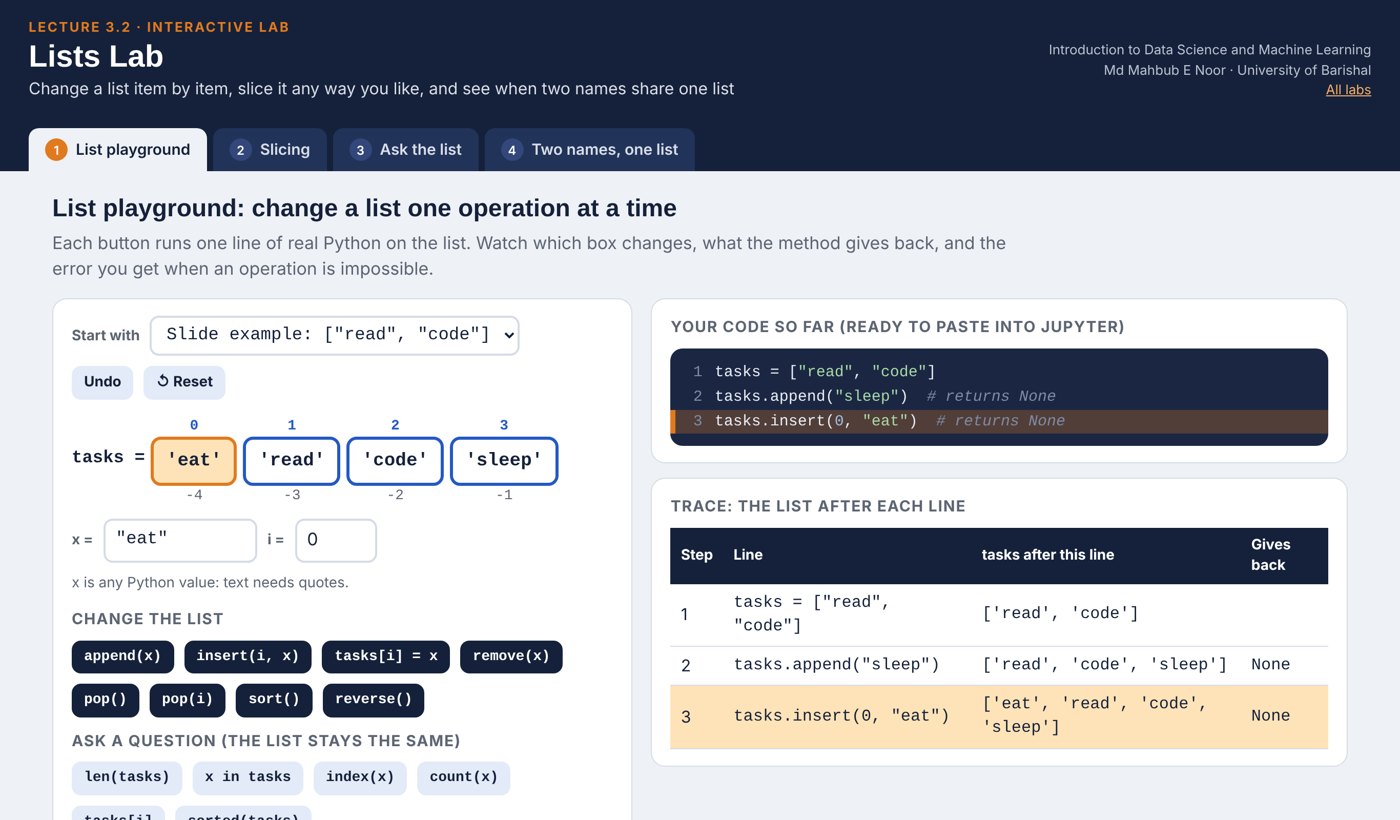
append(x)adds to the endinsert(i, x)adds at position ilist[i] = xreplaces an itemremove(x)deletes the first xpop()removes and returns the last item
tasks = ["read", "code"]
tasks.append("sleep")
tasks.insert(0, "eat")
tasks[1] = "study"
tasks.remove("code")
last = tasks.pop()
print(tasks)
print(last)['eat', 'study'] sleep
Watching the list change, step by step
Each row runs one line. Follow how the list looks after it.
tasks = ["read", "code"]
tasks.append("sleep")
tasks.insert(0, "eat")
tasks[1] = "study"
tasks.remove("code")
last = tasks.pop()| step | operation | tasks after this line |
|---|---|---|
| 1 | create | ['read', 'code'] |
| 2 | append | ['read', 'code', 'sleep'] |
| 3 | insert | ['eat', 'read', 'code', 'sleep'] |
| 4 | replace [1] | ['eat', 'study', 'code', 'sleep'] |
| 5 | remove | ['eat', 'study', 'sleep'] |
| 6 | pop -> 'sleep' | ['eat', 'study'] |
Next row: arrow key or the ▶ button. Predict it first!
Asking questions about a list
len,max,min,sumwork on whole listsx in listchecks membershipcount(x)andindex(x)find itemssorted(list)gives a new sorted list; the original stays
nums = [5, 3, 8, 3, 1]
print(len(nums), max(nums), min(nums), sum(nums))
print(8 in nums)
print(nums.count(3))
print(nums.index(8))
print(sorted(nums))
print(nums)
5 8 1 20
True
2
2
[1, 3, 3, 5, 8]
[5, 3, 8, 3, 1]
sort() versus sorted()
Predict firstnums = [5, 3, 8] result = nums.sort() print(nums) print(result)
What will this print? Write your prediction as a comment before you run the cell.
Answer: sort() versus sorted()
nums = [5, 3, 8]
result = nums.sort()
print(nums)
print(result)
[3, 5, 8]
None
.sort()sorts the list itself, in place- It returns nothing, which Python shows as
None sorted(nums)returns a new sorted list instead- Never write
nums = nums.sort(): you lose the list
Strings behave like lists, almost
- Strings have positions and slices too
len()counts characters- But strings cannot be changed in place
word[0] = "J"gives an error (see the mistakes slide)
word = "PYTHON"
print(word[0], word[-1])
print(word[1:4])
print(len(word))
P N
YTH
6
Anatomy of a tuple
student = ("Nadia", 21, "CSE")
print(student[0])
print(len(student))
Nadia
3
Tuples cannot be changed
- Reading works; changing gives a TypeError
- Use tuples for fixed records: a student, a date, a coordinate
- Fixed means safe: no code can change it by accident
- Functions use tuples to return several values (Lecture 4.1)
student = ("Nadia", 21, "CSE")
print(student[1])
student[1] = 2221 TypeError: 'tuple' object does not support item assignment
Unpacking: one tuple, several names
name, age, dept = studentgives each item a name- The number of names must match the number of items
a, b = b, aswaps two values in one line- You will use this constantly with functions
name, age, dept = student
print(name)
print(age)
a, b = 1, 2
a, b = b, a
print(a, b)
Nadia
21
2 1
List or tuple?
List [ ]
- Square brackets
- Can change: append, remove, replace
- For collections that grow: messages, scores
- Example: an inbox
Tuple ( )
- Round brackets
- Fixed once created
- For records: a student, a coordinate
- Example: several values returned by a function
Careful: two names, one list
b = adoes not copy the list- Both names point to the same list
- Change it through b, and a sees the change
- Use
a.copy()for a real copy
a = [1, 2, 3]
b = a
b.append(4)
print(a)
c = a.copy()
c.append(5)
print(a)
print(c)
[1, 2, 3, 4]
[1, 2, 3, 4]
[1, 2, 3, 4, 5]
Watch it run: changing a list, and two names
WATCH FOR
- append, replace and pop change the list
- pop hands the removed item back
- b = tasks: the note says 'same object'
- b.append changes what tasks shows too
Silent video: press play, pause any time.
Common mistakes with lists and tuples
Read the last line of an error first. It names the problem.
| What you typed | What Python says | What it means |
|---|---|---|
print(inbox[10]) | IndexError: list index out of range | No position 10. Valid positions: 0 to len(inbox) - 1. |
student[1] = 22 | TypeError: 'tuple' object does not support item assignment | Tuples cannot be changed. Use a list, or build a new tuple. |
nums.remove(99) | ValueError: list.remove(x): x not in list | 99 is not in the list. Check with 99 in nums first. |
word[0] = "J" | TypeError: 'str' object does not support item assignment | Strings cannot be changed. Build a new one: "J" + word[1:]. |
In-class exercises
Work in pairs. 15 minutes. No loops yet: use indexing, slicing and list functions.
Second largest
Use sorted() to print the second largest of [4, 9, 2, 7]. Expected: 7. Bonus: what goes wrong with [4, 9, 9, 2]?
Ends of the inbox
Print the first two and the last two messages of a 6-message list, using slices.
Swap ends
Swap the first and last items of a list. Test: [1, 2, 3, 4] becomes [4, 2, 3, 1].
Student record
Store (name, roll, cgpa) as a tuple, unpack it, and print one f-string sentence.
Solutions
Show these after students have tried the exercises.
Solutions 1 and 2
The bonus shows a real limitation: with a repeated maximum, [-2] returns the maximum again.
nums = [4, 9, 2, 7]
print(sorted(nums)[-2])
print(sorted([4, 9, 9, 2])[-2])

inbox = ["m1", "m2", "m3", "m4", "m5", "m6"]
print(inbox[:2])
print(inbox[-2:])
7
9
['m1', 'm2']
['m5', 'm6']
Solutions 3 and 4
Swapping uses tuple unpacking. Unpacking gives each field of a record its own name.
items = [1, 2, 3, 4]
items[0], items[-1] = items[-1], items[0]
print(items)

record = ("Nadia", 1042, 3.71)
name, roll, cgpa = record
print(f"{name} (roll {roll}) has CGPA {cgpa}")[4, 2, 3, 1] Nadia (roll 1042) has CGPA 3.71
Interactive lab: Lists Lab
In the lab you can
- List playgroundAppend, insert, remove and pop: see each box change.
- SlicingDrag start, stop and step and watch which items are taken.
- Ask the listEdit marks: len, max, sum, sorted and a live chart.
- Two names, one listArrows show when b = a shares one list.
Opens in a new tab and works offline. All labs: labs/START_HERE.html
Today's toolkit
[a, b, c] | Make a list |
x[0], x[-1] | First item, last item |
x[1:3] | Items 1 and 2 (stop before 3) |
append / insert | Add items |
remove / pop | Delete items |
sorted(x) / x.sort() | New sorted list / sort in place |
(a, b, c) | Make a tuple (fixed) |
n, a, d = t | Unpack a tuple |
x.copy() | A real, separate copy |
Homework 3.2
Due before Lecture 3.3 · [date]
Predict, then run
Predict first: x = [3, 1, 2]; print(x[::-1]); print(x[5:]); print(sorted(x) == x).
Grade book
Make a list of 5 marks. Print the highest, lowest, average (sum / len) and the marks sorted.
Inbox editor
Start with 3 messages. Add 2, replace the second, remove one by value, and print the list after each step.
Trace it
Draw a trace table (step, list after) for the Inbox editor code by hand, then check it by printing.
Explain
In 2 sentences: why does b = a followed by b.append(4) change a?
Recap: Lecture 3.2 in 90 seconds
Watch it again at home to revise.