Hello, Python
Your first lines of code: numbers, variables and text
Introduction to Data Science and Machine Learning · Md Mahbub E Noor · University of Barishal
print("Hello, Data Science!")Where we are: Lecture 2, part 2 of 3
Today you will
- 1Show results with print()
- 2Use Python as a calculator
- 3Store values in variables
- 4Work with text, the raw material of spam
- 5Read error messages without panic
Why Python?
Reads like English
print("hello") does exactly what it says. Beginners get results on day one.
Free, everywhere
No license to buy. Runs offline in Jupyter, or online in Colab.
Built for data
Tools like pandas and scikit-learn, which we use to build the spam detector, are Python libraries.
print() shows a result
print()displays whatever is inside the brackets- Text goes inside quotes:
"Hello" - Numbers do not need quotes
- Each
print()starts a new line
print("Hello, Data Science!")
print(2 + 3)
print("2 + 3")Hello, Data Science! 5 2 + 3
Python as a calculator
+ - * /work as you expect**means power:7 ** 2is 7 squared/always gives a decimal:7 / 2is3.5#starts a comment: a note Python ignores
# Python as a calculator
print(7 + 3)
print(7 * 3)
print(7 / 2)
print(7 ** 2)
10
21
3.5
49
Variables store values
=means "store this", not "is equal to"- The name goes on the left, the value on the right
- Use clear names:
spam_found, notx - Names use lowercase and underscores, no spaces
messages_today = 12
spam_found = 3
share = spam_found / messages_today
print(share)
0.25
Watch it run: variables changing
WATCH FOR
- Each variable appears in Memory when it is first stored
- x = x + 1 uses the old value
- share does not update by itself
- The highlighted line is the next one to run
Silent video: press play, pause any time.
Every value has a type
int: whole numbers like12float: decimals like0.25str(string): text like"free prize"bool:TrueorFalse, answers to yes/no questions
print(type(12))
print(type(0.25))
print(type("free prize"))
print(type(True))<class 'int'> <class 'float'> <class 'str'> <class 'bool'>
Text is data too
len()counts characters, spaces included.lower()makes all letters small, so FREE and free matchinasks: does this text appear inside?- This is the first building block of a spam filter
message = "Claim your FREE prize now"
print(len(message))
print(message.lower())
print("free" in message)
print("free" in message.lower())25 claim your free prize now False True
f-strings mix text and values
- Put
fbefore the quotes - Anything inside
{ }is calculated and inserted {share:.0%}shows a number as a percentage- Perfect for clear, readable reports
spam_found = 3
total = 12
print(f"{spam_found} of {total} messages were spam")
share = spam_found / total
print(f"That is {share:.0%} of the inbox")3 of 12 messages were spam That is 25% of the inbox
Your turn 5 minutes
- 1Store your first name in a variable called
name - 2Store any text message in
message - 3Print a sentence like: Nadia's message has 42 characters
- 4Print whether the message contains "offer" (ignore capitals)
name = "..."
message = "..."
print(f"...")
print(...)
Starter code: replace the ... with your own code
A first look at errors (more in Lecture 2.3)
Read the last line of an error first. It names the problem.
| What you typed | What Python says | What it means |
|---|---|---|
total = 12 print(totl) | NameError: name 'totl' is not defined | Typo in a name. Python only knows names you created. Check spelling. |
print("hello) | SyntaxError: unterminated string literal (detected at line 1) | A quote or bracket was opened but not closed. Close it. |
print("Total: " + 12) | TypeError: can only concatenate str (not "int") to str | Cannot glue text and a number with +. Use an f-string. |
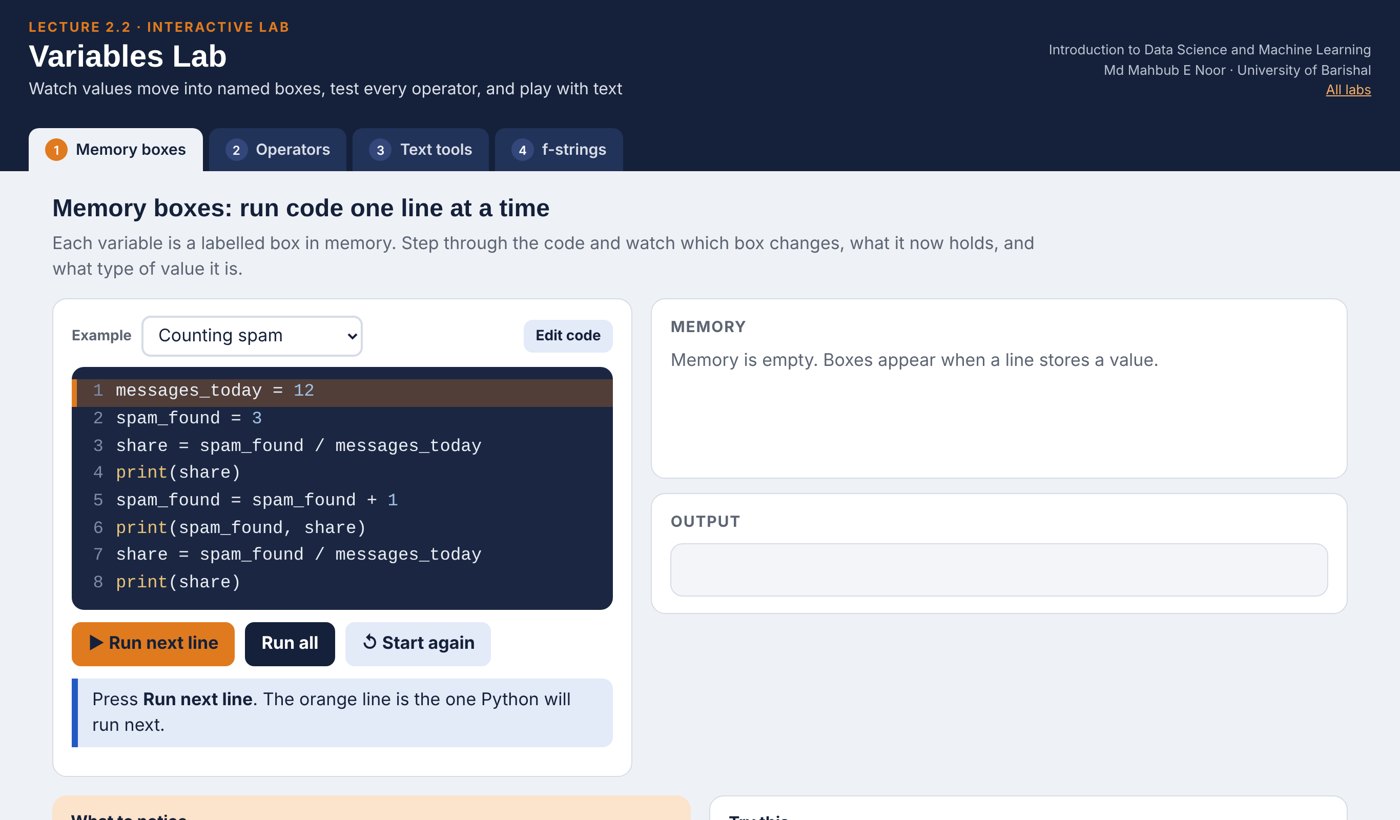
Interactive lab: Variables Lab
In the lab you can
- Memory boxesRun code line by line and watch each box change.
- OperatorsChange a and b: every result and type updates live.
- Text toolsType a message: indexes, len, in and .lower() update.
- f-stringsMove sliders and format numbers with :.2f and :.0%.
Opens in a new tab and works offline. All labs: labs/START_HERE.html
Today's toolkit
print(x) | Show a value |
# note | Comment, ignored by Python |
name = value | Store a value in a variable |
+ - * / ** | Arithmetic, ** is power |
type(x) | Which kind of value is this? |
len(text) | Number of characters |
text.lower() | All letters to lowercase |
"a" in text | Does the text contain "a"? True/False |
f"{x} items" | Insert values into text |
Homework 2.2
Due before Lecture 2.3 · [date]
Set up
Create a notebook (Jupyter or Colab) named HW2_2_<your ID>. Put your name in a text cell at the top.
About me
Store your name, department and favourite number in variables. Print one f-string sentence using all three.
Predict, then run
For each line, write your prediction as a comment first, then run it: print(10 / 4), print(10 // 4), print("ab" * 3), print(len("data science")).
Message inspector
Store a real SMS you received (remove names and numbers). Print its length, its lowercase version, and whether it contains "free".
Break it on purpose
Create one error deliberately. Keep the error message and explain in one sentence what it means.
Recap: Lecture 2.2 in 90 seconds
Watch it again at home to revise.