Preparing features
Missing values, categories, scaling and pipelines
Introduction to Data Science and Machine Learning · Md Mahbub E Noor · University of Barishal
make_pipeline(StandardScaler(),
              KNeighborsClassifier())
The road ahead: machine learning
Today you will
- 1Find and handle missing values
- 2Turn categories into numbers with one-hot encoding
- 3See why scaling changes k-NN, by hand
- 4Scale without leaking test information
- 5Build a pipeline that does it all correctly
Meet the data: invented student records
- 150 invented students, made for this course
- Target: passed (yes / no)
isna().sum()counts missing values per column- Some hours and GPAs are missing, as in real data
import pandas as pd
st = pd.read_csv("students.csv")
print(st.head())
print(st.isna().sum())hours attendance prior_gpa dept passed 0 NaN 55 3.28 CSE yes 1 NaN 88 2.37 EEE yes 2 9.3 81 3.52 Math yes 3 2.7 83 3.52 EEE no 4 3.6 78 3.44 CSE no hours 8 attendance 0 prior_gpa 6 dept 0 passed 0 dtype: int64
Missing values: drop or fill?
dropna()removes rows with any missing value- Fast, but throws data away
fillna(median)keeps rows, guessing a typical value- Choose, and say which you chose in your report
print(len(st), len(st.dropna()))
filled = st.copy()
for col in ["hours", "prior_gpa"]:
    filled[col] = filled[col].fillna(filled[col].median())
print(filled.isna().sum().sum())150 136 0
One-hot encoding: categories become 0/1 columns
A model cannot multiply the word CSE. One-hot encoding gives each category its own yes/no column.
| dept | dept_CSE | dept_EEE | dept_Math |
|---|---|---|---|
| CSE | 1 | 0 | 0 |
| EEE | 0 | 1 | 0 |
| Math | 0 | 0 | 1 |
| CSE | 1 | 0 | 0 |
One-hot encoding in pandas
pd.get_dummies creates the 0/1 columns · dtype=int shows 0 and 1 instead of False/True · Every category gets its own column · In pipelines we use OneHotEncoder instead (later)
dummies = pd.get_dummies(filled["dept"], prefix="dept", dtype=int)
print(dummies.head(4))
   dept_CSE  dept_EEE  dept_Math
0         1         0          0
1         0         1          0
2         0         0          1
3         0         1          0
By hand: why scale matters for k-nearest neighbours
Distance from student A (hours 2, attendance 90) to B (hours 10, attendance 85) and C (hours 3, attendance 60).
# Unscaled: attendance dominates.
#   C looks far, B looks close, although
#   B studies 8 hours more than A!
# After scaling both columns to similar ranges,
#   hours matter again and C is nearer.
| pair | hours gap | attendance gap | distance |
|---|---|---|---|
| A to B | 8 | 5 | 9.4 |
| A to C | 1 | 30 | 30.0 |
| A to B, scaled | 0.67 | 0.08 | 0.67 |
| A to C, scaled | 0.08 | 0.50 | 0.51 |
Next row: arrow key or the ▶ button. Predict it first!
Watch it: scaling changes the neighbours
WATCH FOR
- 14 real rows from students.csv; the star is one student
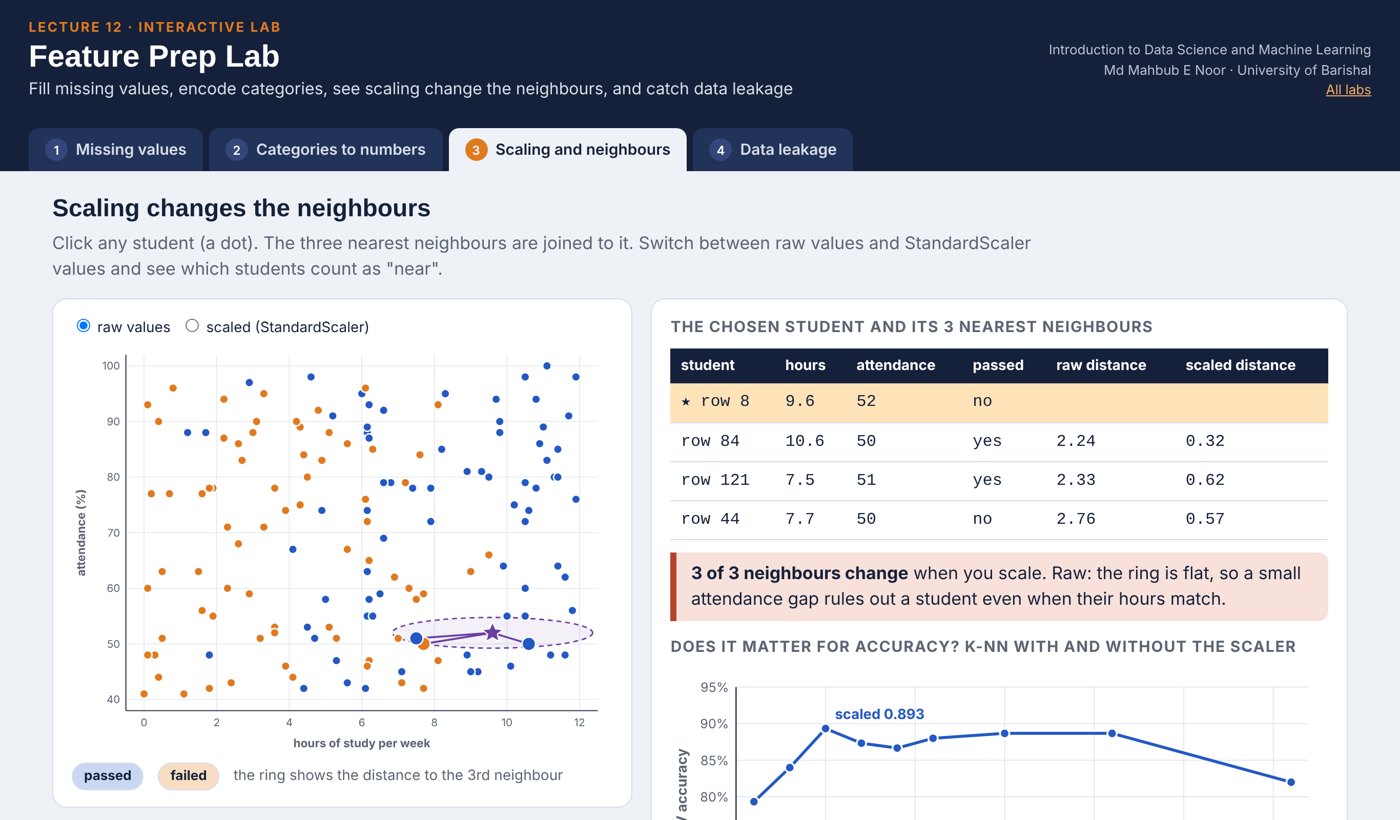
- Unscaled: neighbours chosen almost only by attendance
- The scaler stretches hours to a fair spread
- Scaled: the three nearest neighbours change
Silent video: press play, pause any time.
StandardScaler: mean 0, standard deviation 1
Each column: subtract its mean, divide by its std · Every feature now has a similar range · Fit the scaler on training data only · Then transform both training and test data
from sklearn.preprocessing import StandardScaler
num = filled[["hours", "attendance", "prior_gpa"]]
scaled = StandardScaler().fit_transform(num)
print(num.mean().round(1).to_dict())
print(scaled.mean(axis=0).round(2) + 0.0, scaled.std(axis=0).round(2))
{'hours': 6.1, 'attendance': 70.0, 'prior_gpa': 3.0}
[0. 0. 0.] [1. 1. 1.]Data leakage: the silent killer
What it is
Information from the test set sneaks into training, so scores look better than reality.
Common causes
Scaling or filling with statistics of ALL data; choosing settings on the test set; duplicate rows.
The fix
Split first. Fit every preparation step on training data only. Pipelines do this for you.
Watch it: leakage happening, then prevented
WATCH FOR
- Wrong: the scaler learns from all rows, test included
- Splitting afterwards is too late
- Right: split first, lock the test set away
- The pipeline fits on training rows only
Silent video: press play, pause any time.
A pipeline does every step, in the right order
Numbers: fill missing with the median, then scale · Categories: one-hot encode · Then the model · Inside cross-validation, each step is fitted on training folds only
from sklearn.compose import ColumnTransformer
from sklearn.impute import SimpleImputer
from sklearn.pipeline import make_pipeline
from sklearn.preprocessing import OneHotEncoder
from sklearn.neighbors import KNeighborsClassifier
from sklearn.model_selection import cross_val_score
X = st[["hours", "attendance", "prior_gpa", "dept"]]
y = st["passed"]
prep = ColumnTransformer([
    ("num", make_pipeline(SimpleImputer(strategy="median"),
                          StandardScaler()),
     ["hours", "attendance", "prior_gpa"]),
    ("cat", OneHotEncoder(), ["dept"])])
model = make_pipeline(prep, KNeighborsClassifier())
print(round(cross_val_score(model, X, y, cv=5).mean(), 3))0.893
Does scaling really matter? Measure it.
- Same pipeline, with and without the scaler
- Same data, same cross-validation
- k-NN gains a lot from scaling
- A decision tree would barely change (try it)
def build(scale):
    num_steps = [SimpleImputer(strategy="median")]
    if scale:
        num_steps.append(StandardScaler())
    prep = ColumnTransformer([
        ("num", make_pipeline(*num_steps),
         ["hours", "attendance", "prior_gpa"]),
        ("cat", OneHotEncoder(), ["dept"])])
    return make_pipeline(prep, KNeighborsClassifier())
for scale in [False, True]:
    s = cross_val_score(build(scale), X, y, cv=5).mean()
print("scaled" if scale else "unscaled", round(s, 3))unscaled 0.687 scaled 0.893
Your turn 10 minutes
- 1Revisit Practice 1, task B2: k-NN on wine
- 2Put StandardScaler and KNeighborsClassifier in a pipeline
- 3Compare 5-fold CV accuracy with and without scaling
- 4How big is the difference?
from sklearn.datasets import load_wine
Xw, yw = load_wine(return_X_y=True)
plain = KNeighborsClassifier()
scaled = make_pipeline(StandardScaler(), KNeighborsClassifier())
...
Starter code: replace the ... with your own code
Common feature-preparation mistakes
Read the last line of an error first. It names the problem.
| What you typed | What Python says | What it means |
|---|---|---|
KNeighborsClassifier().fit(filled[["hours", "dept"]], filled["passed"]) | ValueError: could not convert string to float: 'CSE' | Text column: one-hot encode dept first. |
KNeighborsClassifier().fit(st[["hours"]], st["passed"]) | ValueError: Input X contains NaN. | Missing values: fill or drop them first (SimpleImputer). |
OneHotEncoder().fit_transform(st["dept"]) | ValueError: Expected a 2-dimensional container but got <class 'pandas.Series'> instead. Pass a DataFrame containing a si ... | Encoders want a table: use st[["dept"]] with double brackets. |
Interactive lab: Feature Prep Lab
In the lab you can
- Missing valuesDrop, median, mean or 0: see the data and the CV score.
- Categories to numbersOne-hot versus 1, 2, 3: the distances a model sees.
- Scaling and neighboursClick a student; the 3 nearest change after scaling.
- Data leakageOver 90% on coin tosses in the wrong order; spot the leak.
Opens in a new tab and works offline. All labs: labs/START_HERE.html
Today's toolkit
df.isna().sum() | Count missing values |
fillna / SimpleImputer | Fill missing values |
pd.get_dummies / OneHotEncoder | Categories to 0/1 columns |
StandardScaler() | Mean 0, std 1 |
ColumnTransformer | Different steps per column |
make_pipeline(...) | Chain steps and model |
leakage | Test info sneaking into training |
Homework 12
Due before Lecture P2 · [date]
By hand
Scale [2, 4, 6] with StandardScaler by hand: subtract the mean, divide by the standard deviation (divide by count). Check in code.
Wine with scaling
Choose k for a scaled k-NN pipeline on wine with cross-validation, then report test accuracy once.
Tree vs k-NN
On students.csv, compare the pipeline with k-NN and with a decision tree, each scaled and unscaled. Table of 4 CV scores.
Leakage hunt
Describe one way leakage could happen in a project of your choice, and how a pipeline prevents it.
Explain
Why is one-hot encoding better than numbering categories 1, 2, 3?
Recap: Lecture 12 in 90 seconds
Watch it again at home to revise.