LECTURE 7

Seeing data

Charts and basic statistics: the foundation of machine learning

Today's key line of code
df["length"].hist()
df["length"].describe()

The road ahead: machine learning

TodayL7Charts and stats
L8What is ML?
L9Regression
L10Classification
L11Evaluation
L12Features
L13Clustering
L14Responsible ML

Today you will

  1. 1Summarise a column with mean, median and spread
  2. 2Calculate a mean and standard deviation by hand
  3. 3Draw histograms, bar charts, scatter plots and box plots
  4. 4Measure how two columns move together with correlation
  5. 5Know why correlation is not causation
Md Mahbub E NoorLecture 7: Seeing dataUniversity of Barishal2 / 20

Mean and median: two kinds of average

  • mean() adds everything and divides by the count
  • median() is the middle value after sorting
  • One extreme value pulls the mean, not the median
  • Real data often has extremes: report both
Code
import pandas as pd
marks = pd.Series([55, 62, 68, 70, 71, 74, 78, 99])
print(marks.mean())
print(marks.median())
marks2 = pd.Series([55, 62, 68, 70, 71, 74, 78, 300])
print(marks2.mean())
print(marks2.median())
Output
72.125
70.5
97.25
70.5
Md Mahbub E NoorLecture 7: Seeing dataUniversity of Barishal3 / 20

By hand: mean and standard deviation

Standard deviation measures how far values typically are from the mean. Fill each column, then add up the last one.

Code
values = [2, 4, 4, 4, 5, 5, 7, 9]
# mean = sum / count = 40 / 8 = 5
# variance = sum of squared gaps / count
#          = 32 / 8 = 4
# standard deviation = square root = 2
valuevalue - mean(value - mean)²
2-39
4-11
4-11
4-11
500
500
724
9416
sum = 40sum = 32

Next row: arrow key or the ▶ button. Predict it first!

Md Mahbub E NoorLecture 7: Seeing dataUniversity of Barishal4 / 20

describe(): the whole summary at once

  • count, mean, standard deviation (std)
  • min and max: the range
  • 25%, 50%, 75%: quartiles (50% = median)
  • pandas std() divides by count - 1, so 2.14, not 2
Code
values = pd.Series([2, 4, 4, 4, 5, 5, 7, 9])
print(values.std().round(2))
print(values.describe().round(2))
Output
2.14
count    8.00
mean     5.00
std      2.14
min      2.00
25%      4.00
50%      4.50
75%      5.50
max      9.00
dtype: float64
Md Mahbub E NoorLecture 7: Seeing dataUniversity of Barishal5 / 20

Histogram: the shape of one column

A histogram groups values into bins and counts each bin. Spam and normal messages have very different length shapes.

Code
import matplotlib.pyplot as plt
df = pd.read_csv("sms.tsv", sep="\t", header=None,
                 names=["label", "message"])
df["length"] = df["message"].str.len()
ham = df[df["label"] == "ham"]["length"]
spam = df[df["label"] == "spam"]["length"]
plt.hist(ham, bins=40, alpha=0.6, label="ham")
plt.hist(spam, bins=40, alpha=0.6, label="spam")
plt.xlabel("message length (characters)")
plt.ylabel("number of messages")
plt.legend()
plt.show()
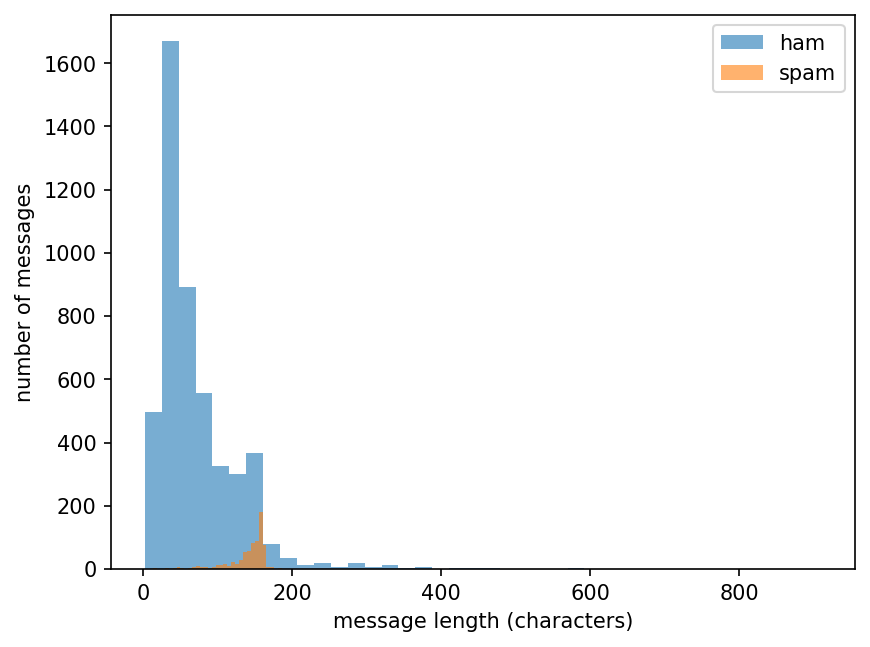
Histogram: the shape of one column
Md Mahbub E NoorLecture 7: Seeing dataUniversity of Barishal6 / 20

Watch it: how a histogram is built

WATCH FOR

  • Each mark drops into the bin covering its value
  • Bar height = how many values in that bin
  • The shape appears as values accumulate
  • plt.hist does all of this in one line

Silent video: press play, pause any time.

Md Mahbub E NoorLecture 7: Seeing dataUniversity of Barishal7 / 20

Bar chart: counts per category

Use a bar chart to compare counts of categories. Always label the axes.

Code
counts = df["label"].value_counts()
plt.bar(counts.index, counts.values,
        color=["tab:blue", "tab:orange"])
plt.ylabel("number of messages")
plt.title("Class imbalance in the SMS data")
plt.show()
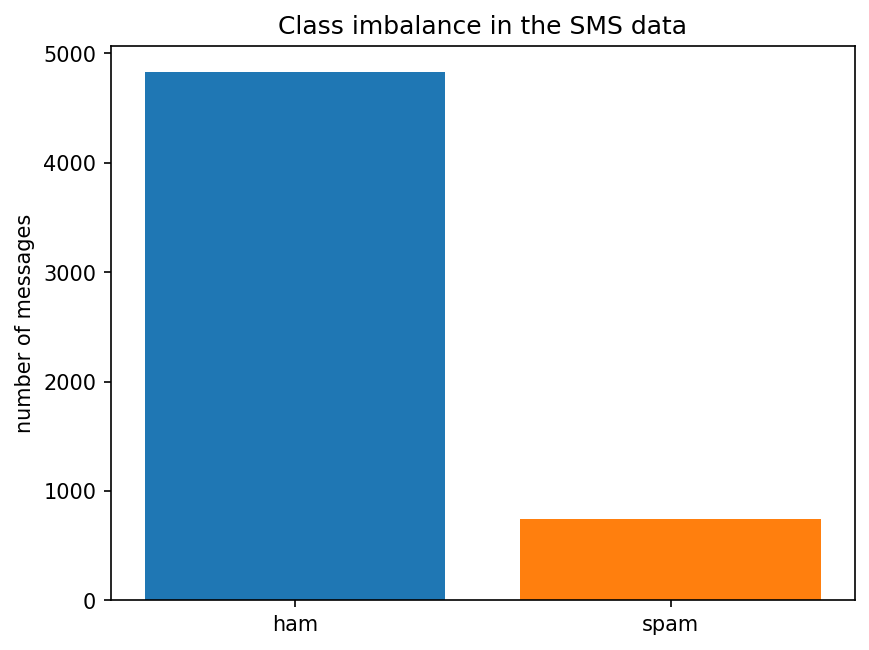
Bar chart: counts per category
Md Mahbub E NoorLecture 7: Seeing dataUniversity of Barishal8 / 20

Scatter plot: two columns at once

Each dot is one student. The pattern shows how marks change with hours studied (a small invented example).

Code
hours = [1, 2, 3, 4, 5, 6, 7, 8]
marks = [42, 48, 55, 60, 58, 70, 75, 81]
plt.scatter(hours, marks)
plt.xlabel("hours studied per week")
plt.ylabel("exam marks")
plt.show()
r = pd.Series(hours).corr(pd.Series(marks))
print(round(r, 3))
Output
0.983
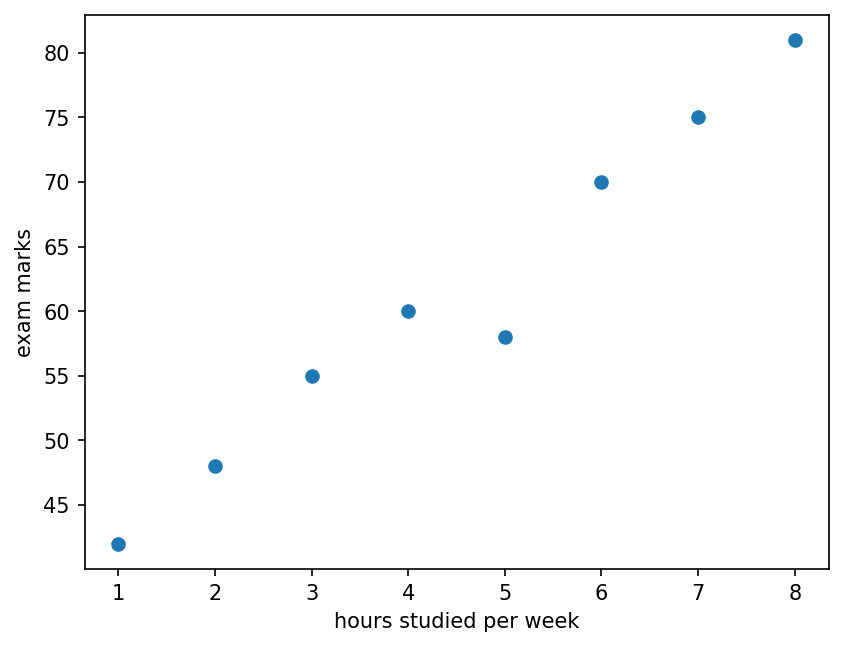
Scatter plot: two columns at once
Md Mahbub E NoorLecture 7: Seeing dataUniversity of Barishal9 / 20

Correlation: how strongly two columns move together

Correlation r runs from -1 to +1. Close to +1: rise together. Close to -1: one rises as the other falls. Near 0: no straight-line pattern.

Code
import numpy as np
rng = np.random.default_rng(0)
x = rng.uniform(0, 10, 60)
ys = {"positive": 2 * x + rng.normal(0, 2, 60),
      "none": rng.normal(10, 4, 60),
      "negative": -2 * x + rng.normal(0, 2, 60)}
fig, axes = plt.subplots(1, 3, figsize=(10, 3))
for ax, (name, y) in zip(axes, ys.items()):
    r = np.corrcoef(x, y)[0, 1]
    ax.scatter(x, y, s=12)
    ax.set_title(f"{name}: r = {r:.2f}")
plt.show()
Md Mahbub E NoorLecture 7: Seeing dataUniversity of Barishal10 / 20

Correlation: how strongly two columns move together: the result
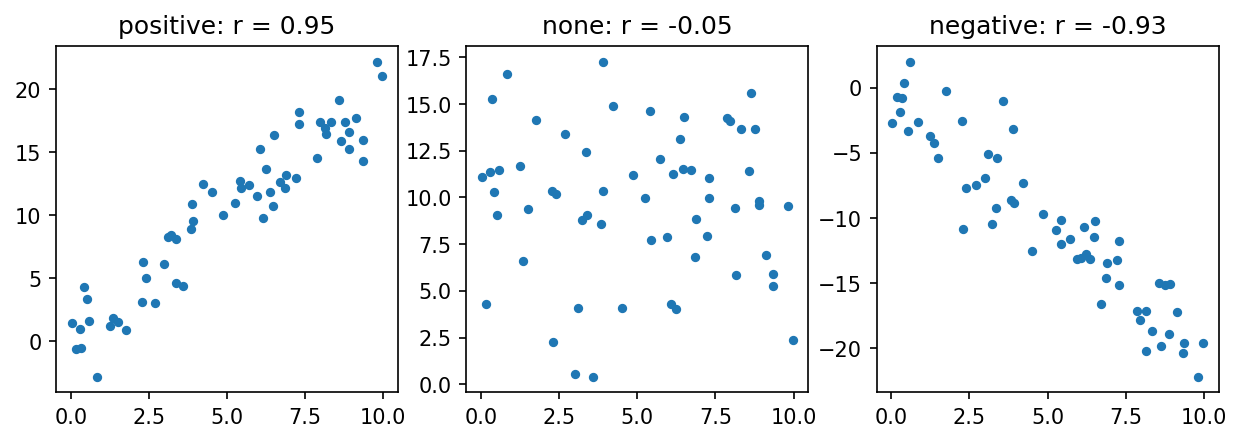
Correlation: how strongly two columns move together
Md Mahbub E NoorLecture 7: Seeing dataUniversity of Barishal11 / 20

Watch it: correlation as the points tighten

WATCH FOR

  • Same points, less and less noise
  • r climbs towards +1 as the line tightens
  • Tilting the slope down makes r negative
  • Adding noise again weakens it

Silent video: press play, pause any time.

Md Mahbub E NoorLecture 7: Seeing dataUniversity of Barishal12 / 20

Correlation is not causation

1

Ice cream and drowning

Both rise in hot weather. Ice cream does not cause drowning; heat drives both.

2

Hidden third factor

A correlation can come from something you did not measure. Ask: what else could explain it?

3

Why it matters for ML

Models use correlations to predict. Prediction is useful, but it does not prove one thing causes another.

Md Mahbub E NoorLecture 7: Seeing dataUniversity of Barishal13 / 20

Box plot: spread and outliers at a glance

The box holds the middle 50% of values, the line is the median, and dots are unusual values (outliers).

Code
plt.boxplot([ham, spam], labels=["ham", "spam"])
plt.ylabel("message length (characters)")
plt.show()
print(ham.median(), spam.median())
Output
52.0 149.0
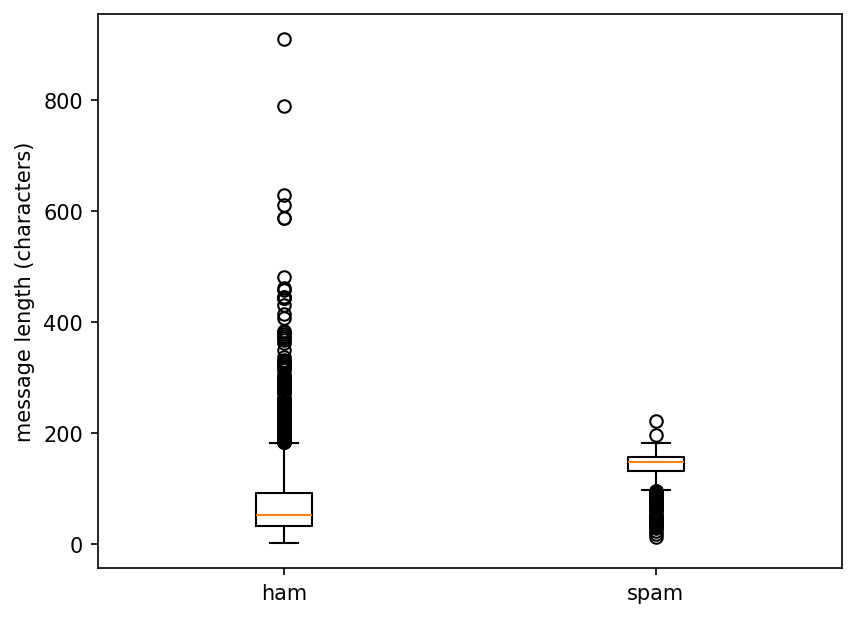
Box plot: spread and outliers at a glance
Md Mahbub E NoorLecture 7: Seeing dataUniversity of Barishal14 / 20

Your turn 10 minutes

  1. 1Load students.csv with pd.read_csv
  2. 2Print describe() for the hours column
  3. 3Draw a histogram of attendance
  4. 4Draw a scatter plot of hours against prior_gpa and print the correlation
Code
st = pd.read_csv("students.csv")
print(st["hours"].describe())
plt.hist(st["attendance"], bins=15)
plt.show()
...

Starter code: replace the ... with your own code

Md Mahbub E NoorLecture 7: Seeing dataUniversity of Barishal15 / 20

Common mistakes with charts and statistics

Read the last line of an error first. It names the problem.

What you typedWhat Python saysWhat it means
plt.scatter([1, 2, 3], [4, 5])
ValueError: x and y must be the same size
x and y must have the same number of values.
print(df["label"].mean())
TypeError: Cannot perform reduction 'mean' with string dtype
You cannot average text. Use value_counts() for categories.
plt.hist(df["lenght"])
KeyError: 'lenght'
Typo in the column name. Check df.columns.
Md Mahbub E NoorLecture 7: Seeing dataUniversity of Barishal16 / 20

Interactive lab: Charts Lab

In the lab you can

  1. Mean, median, spreadDrag one value away and watch the mean move, not the median.
  2. HistogramChange the bins and see the shape change.
  3. Scatter and correlationBuild point clouds, read students.csv, guess r.
  4. Box plotQuartiles, whiskers and outliers, compared by group.
Open the lab ►︎

Opens in a new tab and works offline. All labs: labs/START_HERE.html
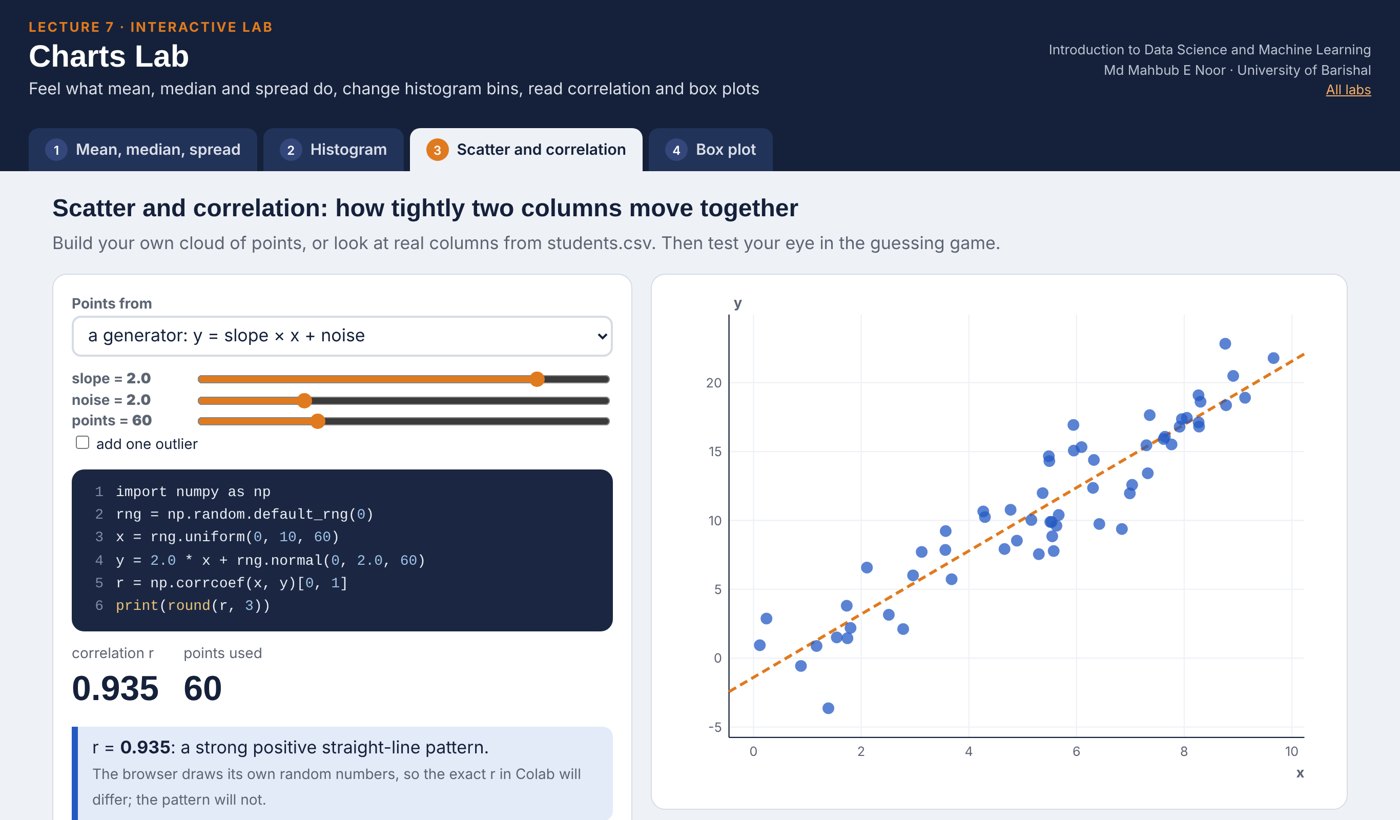
Screenshot of the Charts Lab
Md Mahbub E NoorLecture 7: Seeing dataUniversity of Barishal17 / 20

Today's toolkit

s.mean(), s.median()Two kinds of average
s.std()Typical distance from the mean
s.describe()Full numeric summary
plt.hist(x, bins=)Shape of one number column
plt.bar(names, counts)Compare categories
plt.scatter(x, y)Relationship of two columns
a.corr(b)Strength of a straight-line pattern
plt.boxplot([a, b])Compare spread of groups
Md Mahbub E NoorLecture 7: Seeing dataUniversity of Barishal18 / 20

Homework 7

Due before Lecture 8 · [date]

1

By hand

Compute the mean and standard deviation (divide by count) of 3, 5, 7, 9, 11 in a table like today's. Check with numpy: np.std(values).

2

Median vs mean

Make a list of 7 prices, then replace the largest with a value 10 times bigger. Print mean and median before and after. Explain.

3

Four charts

From students.csv: a histogram, a bar chart of dept counts, a scatter plot and a box plot of hours by passed. Label every axis.

4

Correlation table

Print st[["hours", "attendance", "prior_gpa"]].corr(). Which pair is most correlated?

5

Causation

Write one example of two things that are correlated but where one does not cause the other.

Submit on [LMS / Google Classroom]: your notebook file HW7_<your ID>.ipynb, or a Colab link set to “Anyone with the link can view”.
Md Mahbub E NoorLecture 7: Seeing dataUniversity of Barishal19 / 20