Real data with pandas
Exploring 5,572 real text messages
Introduction to Data Science and Machine Learning · Md Mahbub E Noor · University of Barishal
df = pd.read_csv(url, sep="\t")
df["label"].value_counts()
Where we are on the road to a spam detector
Today you will
- 1Load a real dataset from the internet with pandas
- 2Look inside a table: rows, columns, single messages
- 3Count spam and normal messages
- 4Add new columns and compare groups
- 5Clean out duplicates, and see why they matter
Meet the dataset: SMS Spam Collection
5,572 real messages
Real SMS messages, each labeled by people as spam or ham (normal).
Where from
Published in 2011 by Almeida and Hidalgo, and shared on the UCI Machine Learning Repository.
Its limits
Mostly UK and Singapore messages from around 2011. Today's scams and our local slang are not in it.
Load the data in one line
import pandas as pdloads the library, nicknamedpdread_csvreads a table from a file or web linksep="\t": columns are separated by tabsdf(DataFrame) is a table;.shapeis (rows, columns)
import pandas as pd

url = ("https://raw.githubusercontent.com/"
       "justmarkham/pycon-2016-tutorial/"
       "master/data/sms.tsv")
df = pd.read_csv(url, sep="\t", header=None,
                 names=["label", "message"])
print(df.shape)(5572, 2)
In the lab (offline): load from a file
- Lab PCs have no internet, so the web link cannot work
- Copy
sms.tsvinto the same folder as your notebook - Then give
read_csvthe file name instead of the link - Same data, same result. At home in Colab, either way works
df = pd.read_csv("sms.tsv", sep="\t", header=None,
                 names=["label", "message"])
print(df.shape)(5572, 2)
Look before you leap
df.head() shows the first 5 rows. Long messages are cut short with ... on screen, but the full text is still there.
print(df.head())
  label                                            message
0   ham  Go until jurong point, crazy.. Available only ...
1   ham                      Ok lar... Joking wif u oni...
2  spam  Free entry in 2 a wkly comp to win FA Cup fina...
3   ham  U dun say so early hor... U c already then say...
4   ham  Nah I don't think he goes to usf, he lives aro...
Read one message in full
df["message"]selects one column.loc[2, "message"]selects row 2, column message- Read a few messages yourself before modeling
- What clues would you use to spot spam?
full = df.loc[2, "message"]
print(full)
print(len(full))
Free entry in 2 a wkly comp to win FA Cup final tkts 21st
May 2005. Text FA to 87121 to receive entry question(std
txt rate)T&C's apply 08452810075over18's
155
How much spam is there?
value_counts()counts each label- Only about 13% of messages are spam
- A lazy model that always says "ham" would be about 87% right
- Remember this number: it is the score to beat
print(df["label"].value_counts())
Messages per label
Spam messages are longer
.str.len()measures every message at once- A new column:
df["length"] groupby("label")splits the table by label- Spam averages about twice the length of ham
df["length"] = df["message"].str.len()
avg = df.groupby("label")["length"].mean()
print(avg.round(1))
Average length (characters)
Watch it: filtering and grouping
WATCH FOR
- The filter asks a True/False question of every row
- Rows answering False are dropped
- groupby splits rows into one group per label
- mean() is computed inside each group
Silent video: press play, pause any time.
Clean out duplicate messages
duplicated()marks rows seen before- 403 messages appear more than once
- Spammers send the same text to many people
- Duplicates could leak into both training and testing, so we drop them
print(df.duplicated().sum())
df = df.drop_duplicates()
print(df.shape)
print(df["label"].value_counts())
403
(5169, 3)
label
ham     4516
spam     653
Name: count, dtype: int64
Test a rule on real data
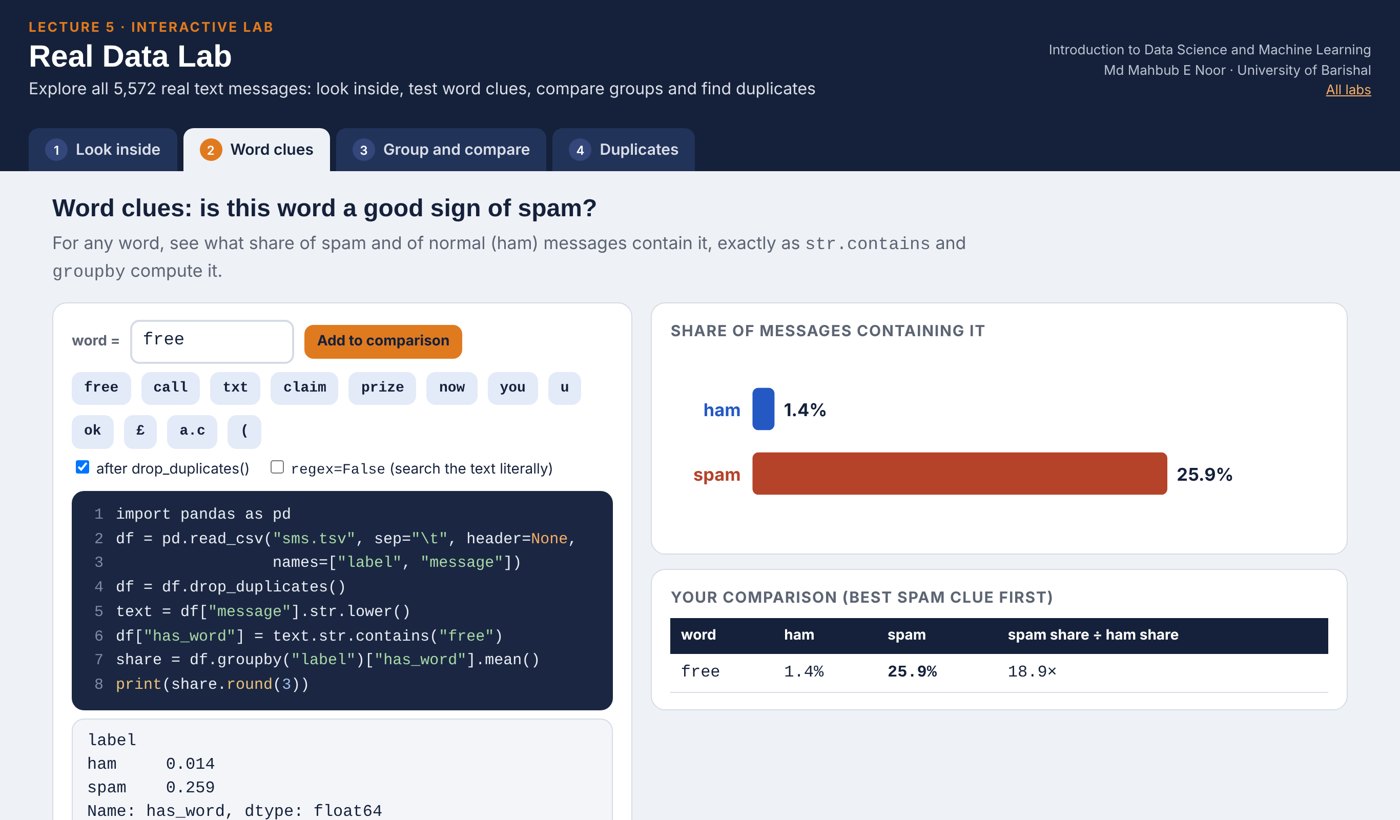
str.contains("free")checks every message at once- Mean of True/False = the share that is True
- "free" appears in far more spam than ham
- Yet 3 in 4 spam messages never say "free"
text = df["message"].str.lower()
df["has_free"] = text.str.contains("free")
share = df.groupby("label")["has_free"].mean()
print(share.round(3))label ham 0.014 spam 0.259 Name: has_free, dtype: float64
Your turn 7 minutes
- 1Pick a word you think signals spam (e.g. "call", "txt", "win")
- 2Compute the share of spam and ham containing it
- 3Is it a better clue than "free"?
- 4Bonus: print 3 random spam messages with
.sample(3)
word = "call"
df["has_word"] = text.str.contains(word)
print(df.groupby("label")["has_word"].mean())

spam = df[df["label"] == "spam"]
print(spam["message"].sample(3))Common pandas mistakes
Read the last line of an error first. It names the problem.
| What you typed | What Python says | What it means |
|---|---|---|
print(df["Label"]) | KeyError: 'Label' | Column names are case-sensitive. The column is "label". |
print(df.lenght) | AttributeError: 'DataFrame' object has no attribute 'lenght' | Typo in a name. Check spelling, or print(df.columns). |
print(df["message"].lower()) | AttributeError: 'Series' object has no attribute 'lower' | A column is not a single string. Use .str.lower() for text columns. |
Interactive lab: Real Data Lab
In the lab you can
- Look insidehead, tail, filters and df.loc on all 5,572 real messages.
- Word cluesShare of spam and ham containing any word you choose.
- Group and compareLengths by label, and can length alone find spam?
- DuplicatesSee what repeats and how duplicates leak into a test.
Opens in a new tab and works offline. All labs: labs/START_HERE.html
Today's toolkit
import pandas as pd | Load the pandas library |
pd.read_csv(url) | Read a table from a file or link |
df.shape, df.head() | Size, and a first look |
df["col"] | Select one column |
df.loc[row, "col"] | Select a single cell |
value_counts() | Count each value |
df["new"] = ... | Add a column |
df.groupby("label") | Split by label to compare groups |
drop_duplicates() | Remove repeated rows |
df[df["label"]=="spam"] | Keep only matching rows |
Homework 5
Due before Lecture 6 · [date]
Load it yourself
In a new notebook, load the dataset, print its shape, and count the labels.
Read like a detective
Print 5 spam messages with spam["message"].sample(5, random_state=<your roll number>). List 3 patterns you notice.
Best single clue
Test 3 words of your choice. For each, print the share of spam and ham containing it. Which is the best clue, and why?
Make a chart
Plot average length by label with .plot(kind="bar", title="..."). Give it a clear title.
Think
A model always predicts "ham". What is its accuracy after removing duplicates? Why would it still be useless?
Recap: Lecture 5 in 90 seconds
Watch it again at home to revise.